
Mission Features
Beyond the live dashboard, the Astronaut Health Intelligence Platform (AHI) has tools that deal with the realities of a long mission: distance from Earth, subjective wellbeing, long term budgets, shift changes and "what if" questions. All of them use simulated data and say so.
Earth link and Mars delay
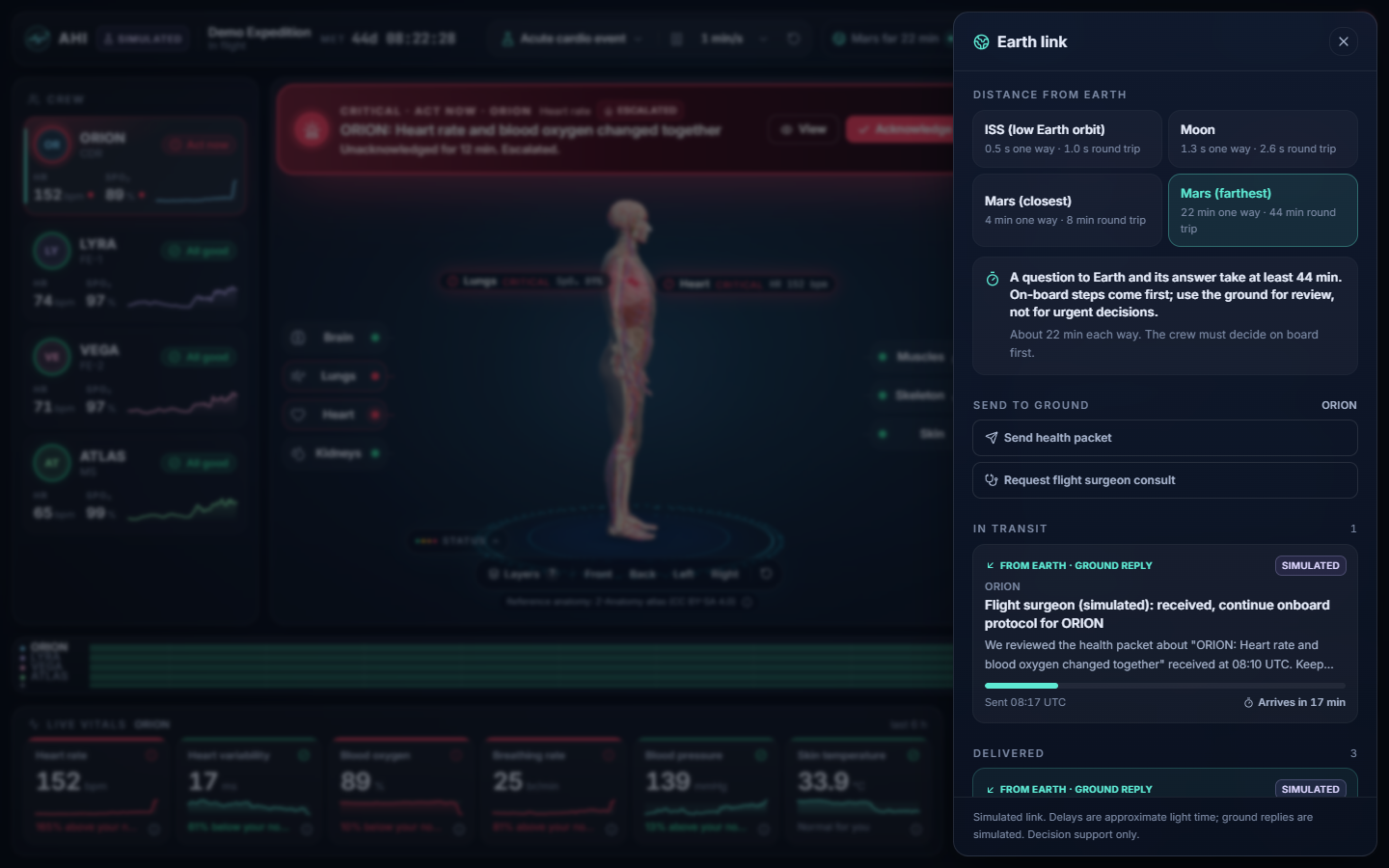
Hazard addressed: distance from Earth. Click the Mission and Earth link control in the top bar (it shows the profile and the one way delay, for example "ISS 0.5 s") to open the Mission and Earth link panel, then choose its Earth link tab.
Profiles
| Profile | One way delay | Round trip | What it means |
|---|---|---|---|
| ISS (low Earth orbit) | 0.5 s | 1 s | Near real time link with Mission Control |
| Moon | 1.3 s | 2.6 s | Ground support stays practical |
| Mars (closest) | about 4 min | about 8 min | Every question to Earth costs at least 8 min |
| Mars (farthest) | about 22 min | about 44 min | The crew must decide on board first |
Choosing a mission profile in the top bar sets the matching Earth link (ISS to ISS, Moon to Moon, Mars transit to Mars farthest); the link can still be changed by hand. Profiles, cited values and the space weather advisory: Mission profiles.
Delays are approximate public figures for light time. The drawer explains the consequence in one sentence, for example "A question to Earth and its answer take at least 44 min. On-board steps come first; use the ground for review, not for urgent decisions."
Messages
| Kind | Direction | How it is created |
|---|---|---|
| Health packet | To Earth | Automatically when an alert reaches HIGH or CRITICAL (once per alert), or by Send health packet |
| Consult request | To Earth | Request flight surgeon consult for the selected astronaut |
| Ground reply | From Earth | Simulated flight surgeon reply to a delivered health packet or consult request |
| Handover report | To Earth | Send to ground in the shift handover report |
Every message is In transit (with a progress bar and countdown) until the simulated clock passes its arrival time, then Delivered. A simulated flight surgeon reviews each delivered health packet or consult request for 4 to 8 sim minutes, then sends a reply that travels back with the same delay. The reply acknowledges, asks the crew to continue the onboard protocol and to re-check in 10, 30, 60 or 120 minutes (for CRITICAL, HIGH, MODERATE or LOW), never prescribes medication, and states that it is simulated.
On board first steps
Under the Mars profiles, any HIGH or CRITICAL item that needs ground review also creates one on board first step per astronaut:
Crew medical officer: start the onboard assessment protocol now
Its rationale states the earliest possible Earth reply: two times the one way delay plus the minimum 4 minute review, about 48 minutes for Mars farthest. Recommendations carry an autonomy badge (Can act on board now or Needs flight surgeon), and with a large delay the flight surgeon badge also shows the round trip wait.
Simulated link
No real communication system is involved. Delays, review times and replies are demo configuration (COMMS in src/engine/config.ts). Ground replies are templated simulations, not medical advice.
Daily check-in
Hazard addressed: isolation and confinement. A 30 second questionnaire, simplified in the style of the NASA Standard Measures:
| Question | Scale (1 to 5) |
|---|---|
| How is your mood? | Very low, Low, Okay, Good, Very good |
| How tired do you feel? | Rested, Slightly tired, Tired, Very tired, Exhausted |
| How stressed do you feel? | Calm, A little, Moderate, High, Very high |
| How well did you sleep? | Very poorly, Poorly, Fair, Well, Very well |
Plus optional symptom tags (headache, congestion, back pain, nausea, eye discomfort, trouble sleeping, or none) and a free note.
- Open it from the clipboard icon on the stage header, or from Start check-in in the Crew view.
- Answers you type are saved as
MANUAL. Each simulated astronaut also checks in automatically around 07:00 UTC sim time (SIMULATED). A manual answer replaces that day's simulated one. - Mood, fatigue and stress are compared with the person's own previous answers. Self report is capped at MODERATE and never raises an alert on its own: it corroborates objective signals (for example, high reported fatigue adds a factor to the fatigue pattern).
- Reported symptoms appear as informational factors ("You reported a headache today"), never as a diagnosis.
Details: Self-report and Earth link.
Mission overview
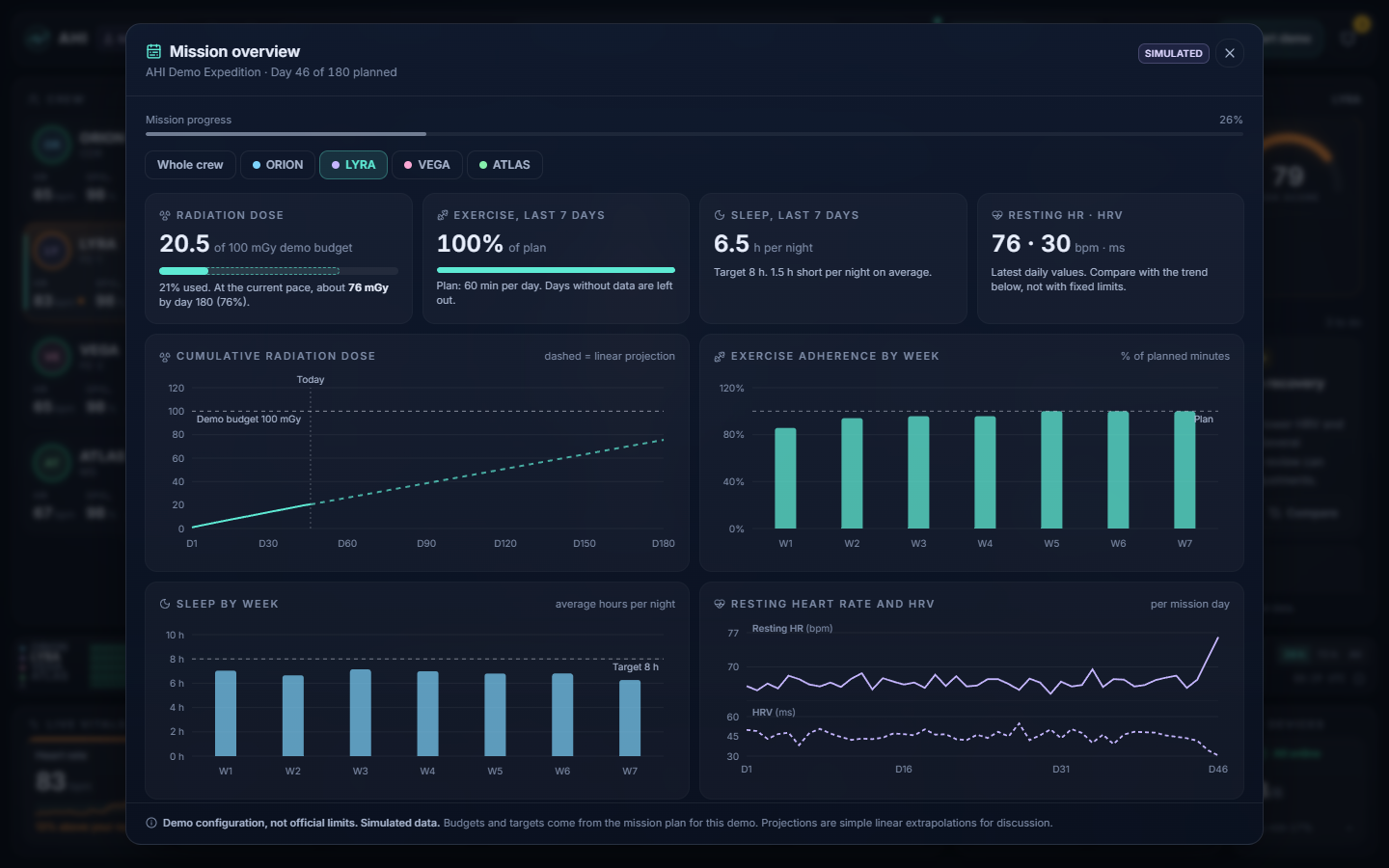
Tools > Mission overview. The long term view of the mission, per crew member or for the whole crew.
| Card | What it shows |
|---|---|
| Mission progress | Mission day out of the 180 planned days |
| Radiation dose | Cumulative dose against a 100 mGy demo budget, with a dashed linear projection to the end of the mission |
| Exercise, last 7 days | Minutes against the plan of 60 min per day, plus weekly adherence (% of planned minutes) |
| Sleep, last 7 days | Average hours per night against an 8 h target, plus a weekly chart |
| Resting HR and HRV | One value per mission day |
| Daily risk level | A ribbon with one cell per mission day |
The Whole crew tab has a comparison table and the cumulative dose of every crew member against the demo budget.
Demo configuration, not official limits
The 180 day plan, the 100 mGy radiation budget, the 60 min exercise plan and the 8 h sleep target are demo values (MISSION_PLAN in config.ts). Older mission days are synthesized from each astronaut's profile; only the recent days come from the simulation history. Projections are simple linear extrapolations for discussion.
Shift handover report
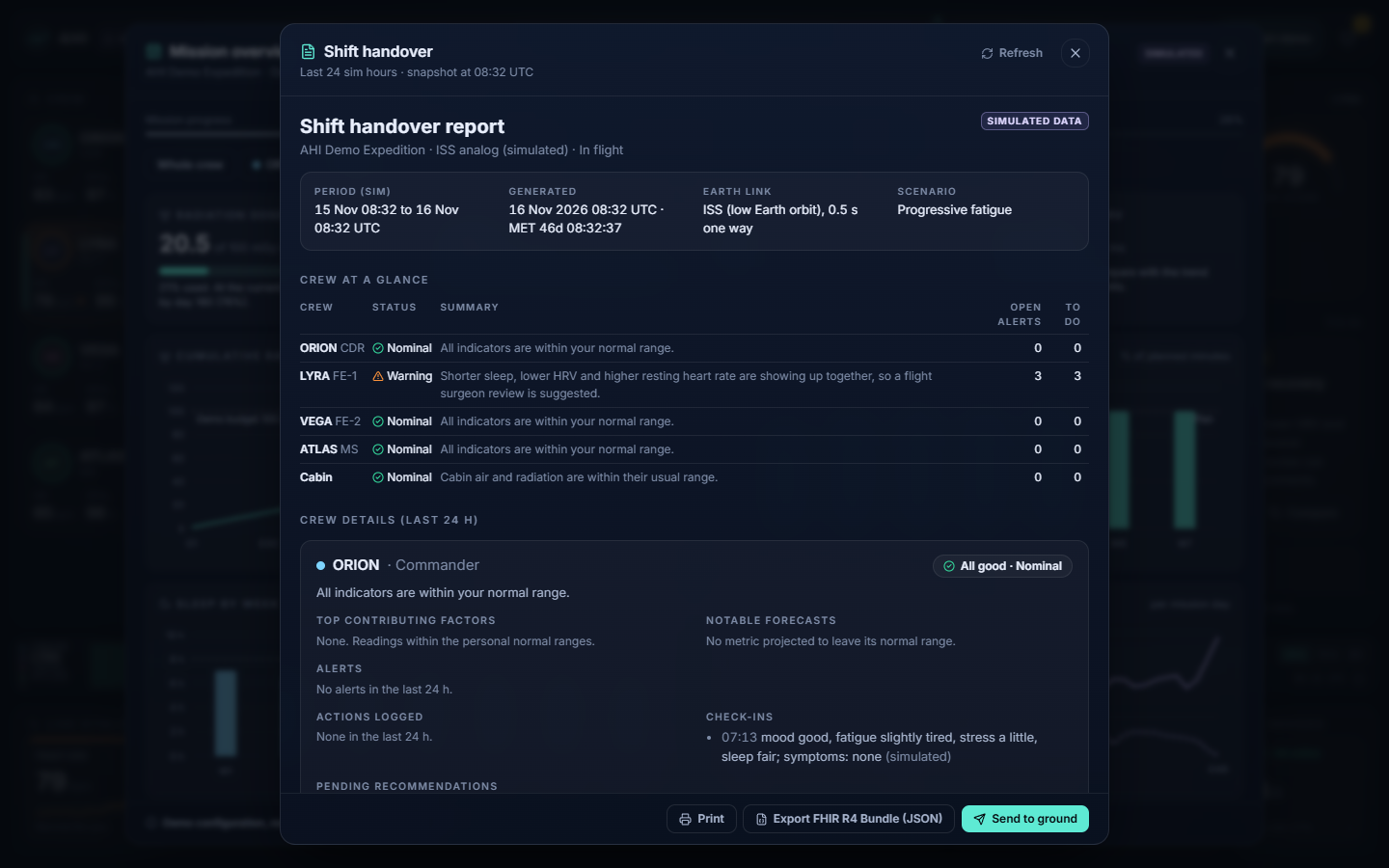
Tools > Shift handover. A printable report of the last 24 sim hours, generated from the current state.
Sections:
- Header: period, generation time, Earth link profile, scenario, and a SIMULATED DATA label.
- Crew at a glance: status, summary and open alerts per astronaut and for the cabin.
- Crew details: top contributing factors, notable forecasts, alerts, actions logged, check-ins and pending recommendations.
- Cabin environment and Earth link messages of the last 24 h.
- Footer: "Decision support only. Not a diagnosis and not a medical device."
Actions:
| Button | What it does |
|---|---|
| Refresh | Regenerates the report from the current state |
| Opens the browser print dialog (print styles included) | |
| Export FHIR R4 Bundle (JSON) | Downloads a FHIR R4 Bundle of type collection |
| Send to ground | Queues a short plain text version as a HANDOVER_REPORT message on the Earth link |
FHIR R4 export
The export is built in the browser, with no server:
Patientresources with pseudonymized ids only (no name, birth date, gender or other personal data),Deviceresources for the simulated adapters,Observationresources for the current value of every tracked metric.
LOINC codes are used only where they are well established (heart rate 8867-4, respiratory rate 9279-1, systolic 8480-6 and diastolic 8462-4 blood pressure, oxygen saturation 59408-5). Every other metric uses the local code system urn:ahi:metric. The data origin (SIMULATED, MANUAL...) travels as a meta tag on every resource.
Interoperability demo
This is an interoperability demo, not a validated clinical interface.
What-if comparison
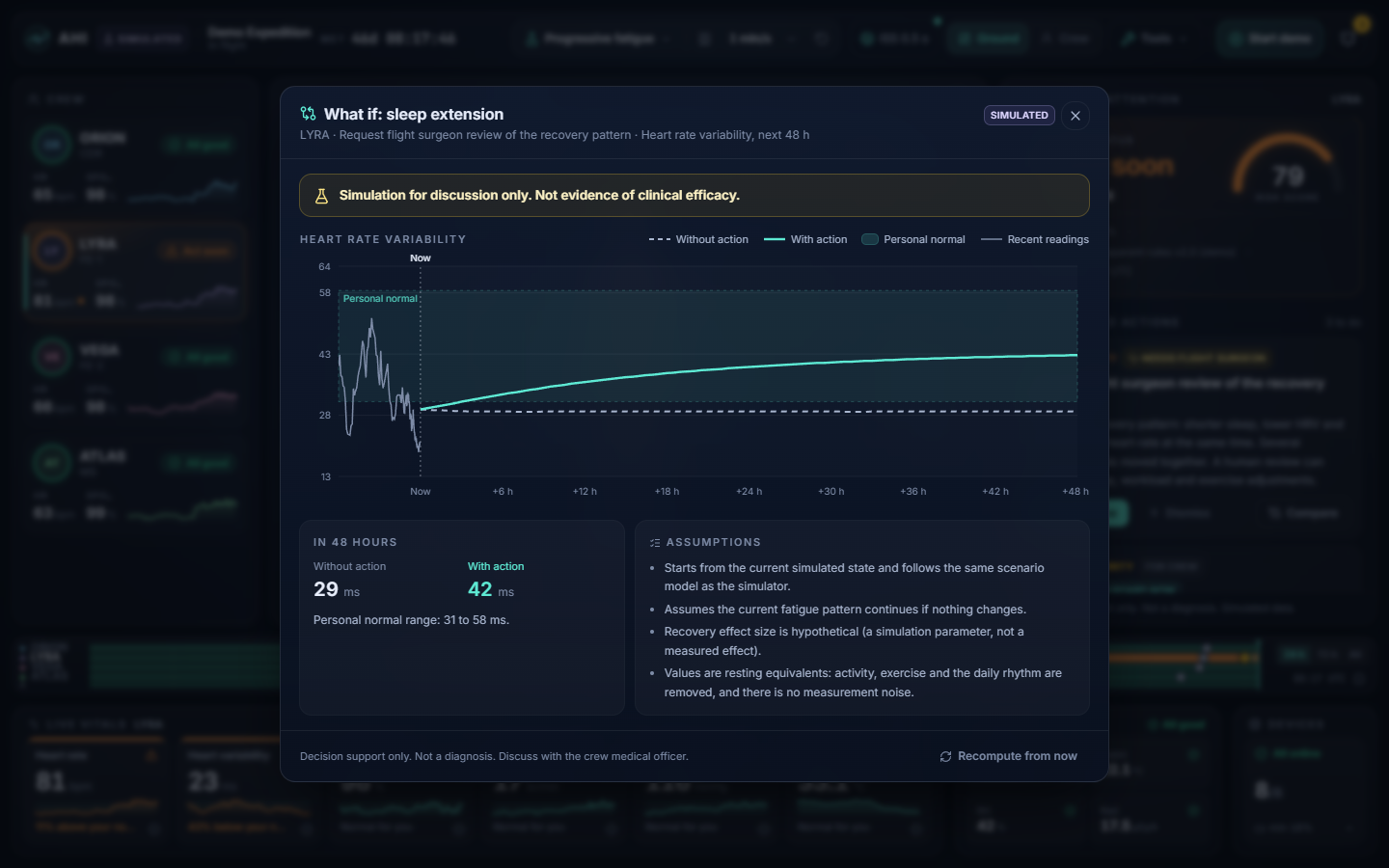
Click Compare on a recommended action to see two projected trajectories for the next hours: without the action and with it, side by side, against the personal normal band and the last 6 h of history.
| Action | Metric shown | Horizon |
|---|---|---|
| Sleep extension | Heart rate variability | 48 h |
| Rest protocol, medical consult | Heart rate | 24 h (2 h while an acute event is active) |
| Cabin ventilation | Cabin CO2 | 8 h |
| Exercise adjustment | Exercise performance | 120 h, one point per planned session |
| Hydration | Hydration index | 12 h |
| Sensor check | No comparison |
The comparison runs the noise free simulation model twice from the current state, lists its assumptions and always shows the disclaimer:
Simulation for discussion only. Not evidence of clinical efficacy.
Effect sizes are made up simulation parameters, not evidence. See Recommendations, autonomy and what-if.
Data and model
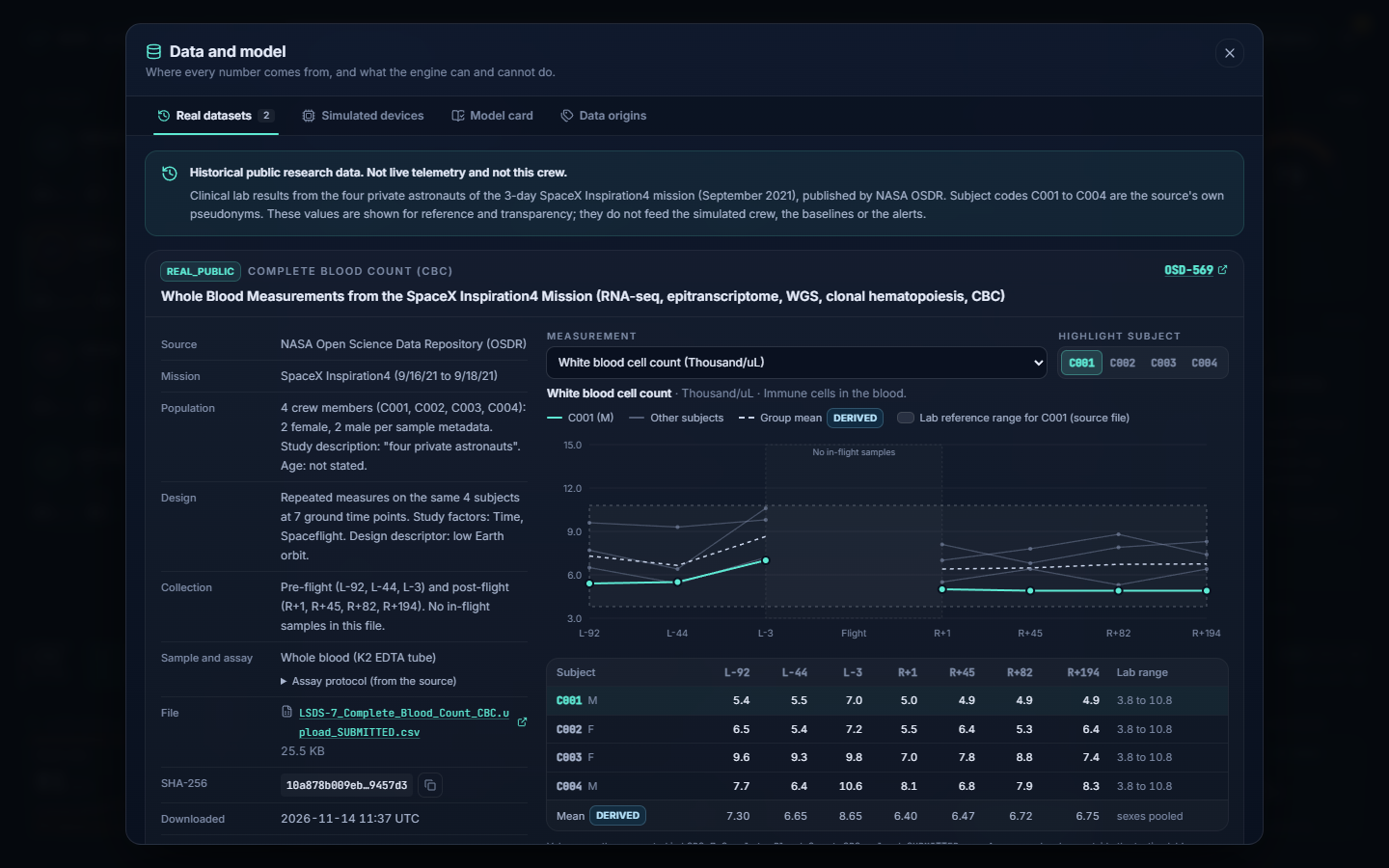
Tools > Data and model: "Where every number comes from, and what the engine can and cannot do." Four tabs:
| Tab | Content |
|---|---|
| Real datasets | The two NASA OSDR Inspiration4 panels (OSD-569 complete blood count, OSD-575 comprehensive metabolic panel). Pick an analyte to see each subject across the 7 time points (L-92 to R+194), a break where the flight has no samples, the lab range printed in the source, the group mean (DERIVED, sexes pooled), the assay protocol and the file SHA-256. Labeled "Historical public research data. Not live telemetry and not this crew." |
| Simulated devices | Every simulated adapter, its metrics and state, its real world counterpart and the honest path to real data (no public live API is assumed) |
| Model card | Evaluation on simulated data, method, intended use and limitations (see Model card) |
| Data origins | The four data_origin labels, what they mean and where each appears in AHI |
More on the datasets: Dataset catalog.
Next steps
- Demo scenarios: use these features in a story.
- Self-report and Earth link: the rules behind the check-in and the delay.
- Responsible use: why every screen says "simulated".