
Demo Scenarios & Guided Demo
The Astronaut Health Intelligence Platform (AHI) ships with seven scripted scenarios. Each one tells a short story about a crew member or the cabin, with simulated data. Pick one in the scenario player (top bar, center), choose a speed, and press play.
How time works
Every scenario starts at 08:00 UTC sim time, after 5 days of pre-generated history. The speed sets how many simulated seconds pass per real second: Real time (1x), 1 min/s (60x), 10 min/s (600x) and 1 h/s (3600x). Detection times below are in simulated time; divide by the speed to get real seconds.
The seven scenarios
| Scenario | Who | What happens | Best speed |
|---|---|---|---|
| Nominal day | All | Stable. Everyone stays within their personal ranges | any |
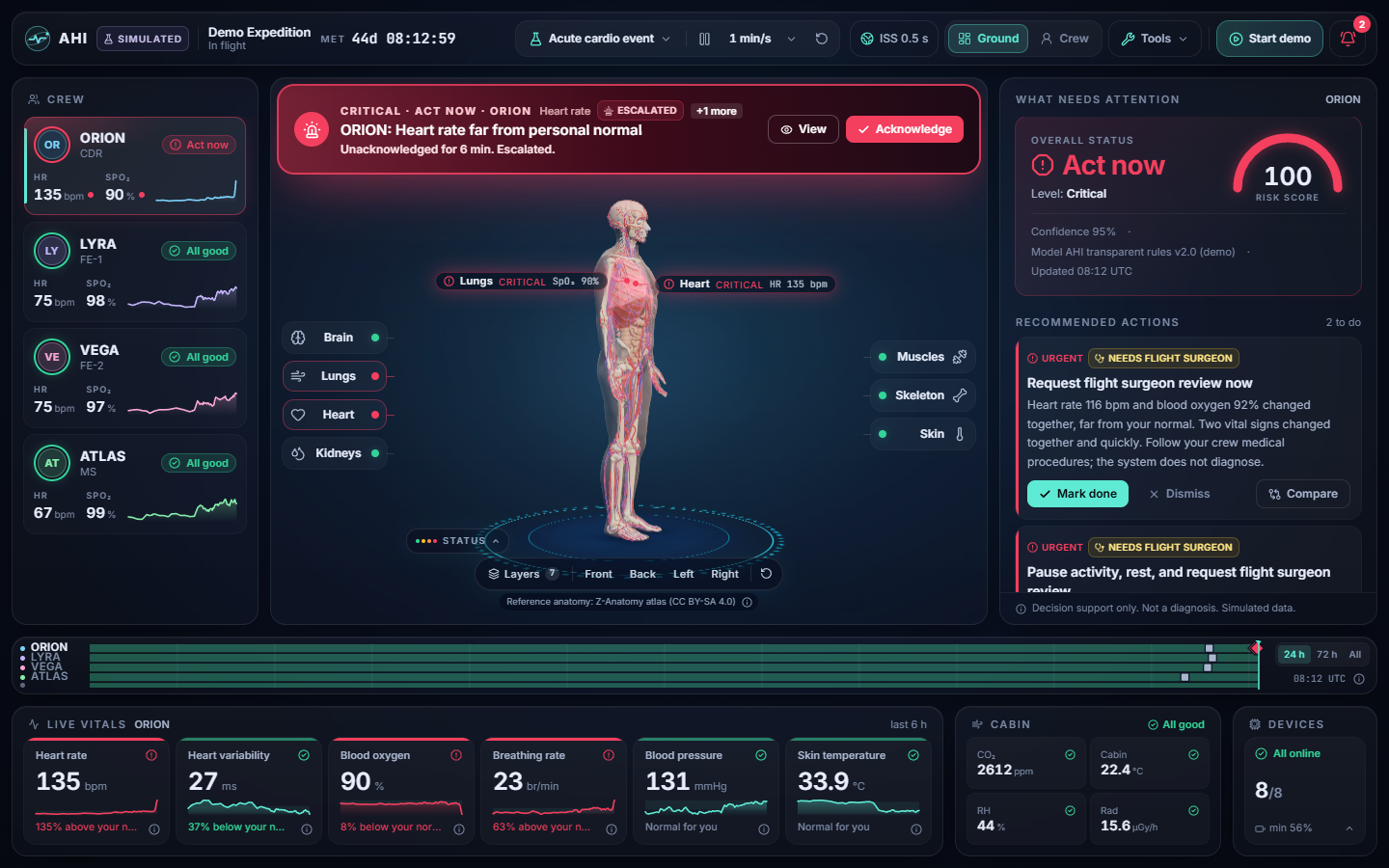
| Acute cardio event | ORION (Commander) | Heart rate climbs to about 145 bpm at rest while blood oxygen drops to about 89% (between minute 2 and 14) | 1 min/s |
| Sensor failure | VEGA (Flight Engineer) | Bio-Monitor shirt goes DEGRADED at 10 min, DATA_STALE at 20 min and OFFLINE at 45 min | 1 min/s |
| Cabin CO2 rise | Cabin, whole crew | CO2 scrubber degradation raises cabin CO2 by about 3,900 ppm over about 3.5 h; breathing rate and reaction time shift for everyone | 10 min/s |
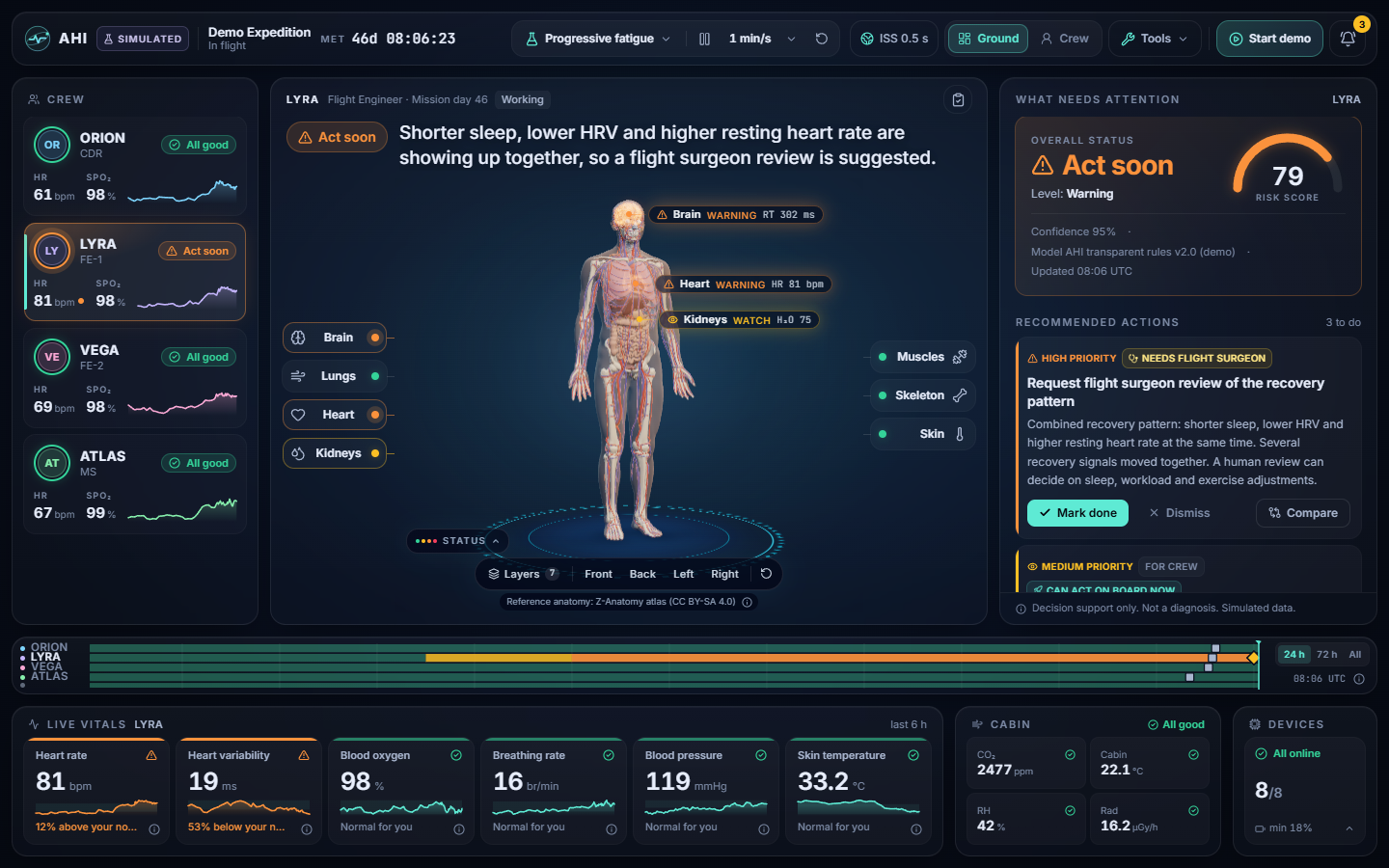
| Progressive fatigue | LYRA (Flight Engineer) | Over about 54 h: later bedtime, lower sleep efficiency, HRV down 38%, resting heart rate up 8 bpm | 1 h/s |
| Exercise performance decline | ATLAS (Mission Specialist) | Workout output falls about 7.5% per day (down to 32% below the usual) | 1 h/s |
| Eye changes (SANS like) | ORION (Commander) | Simulated eye exams drift from the pre-flight baseline: thicker retina, wider optic nerve sheath, then new folds. The flight day 30 exam already reads Watch when the scenario starts (mission day 44); the flight day 90 exam reads Warning | any |
When things happen on screen
Real seconds after pressing play at the suggested speed, derived from the simulated detection times measured by npm run evaluate. The simulated times, peaks and scores themselves are listed once, in Results and evidence.
| Scenario | First alert at the suggested speed | Reaches HIGH |
|---|---|---|
| Acute cardio event | about 7 s at 1 min/s | same moment (also CRITICAL) |
| Sensor failure | about 14 s at 1 min/s | never (MODERATE by design) |
| Cabin CO2 rise | about 9 s at 10 min/s | about 14 s |
| Progressive fatigue | about 32 s at 1 h/s | about 33 s |
| Exercise performance decline | about 28 s at 1 h/s | about 76 s |
In the nominal scenario nothing should happen: the evaluation found no alert at MODERATE or above.
By design
Slow scenarios are capped at HIGH: they call for review, not an emergency response. Only the acute cardio event reaches CRITICAL. The sensor failure is a data quality case: it reaches MODERATE ("signal lost, status unknown") and never looks normal.
What to observe
Nominal day
Everything is green: "All good" on every card, "All indicators are within your normal range." Point out the personal normal bands and that the risk score is 0.
Acute cardio event (ORION)
- Heart rate rises and blood oxygen drops; the heart and lungs light up in red on the 3D body, visible through the chest without a click.
- A CRITICAL banner appears; the alerts bell pulses. Combined rule R-CARD-01 fires when heart rate and SpO2 are both HIGH or worse.
- Recommended actions: "Pause activity, rest, and request flight surgeon review" and "Request flight surgeon review now", both flagged Needs flight surgeon. Under the Mars profiles an on board first step for the crew medical officer is added on top.
- Mark done on the rest action logs a rest protocol in the audit trail; the simulator then shows a hypothetical recovery, clearly labeled as simulation.
- If nobody acknowledges, the alert escalates after 5 and 15 sim minutes.
- A health packet goes to Earth automatically.
Sensor failure (VEGA)
- The shirt goes Degraded, then Data stale, then Offline in the devices panel.
- The organs fed by the shirt turn grey, the heart stops beating and the card says Signal lost: missing data is never shown as normal.
- The recommendation is to check sensor fit and skin contact. Confidence drops.
Cabin CO2 rise (cabin)
- CO2 climbs past the demo watch level (4,000 ppm) and warning level (5,300 ppm).
- Breathing rate and reaction time shift slightly for everyone. Rule R-ENV-CO2-02 reports the co-occurrence and reminds that correlation is not causation.
- Suggested action: ventilate the module and check the CO2 scrubber (on board).
Progressive fatigue (LYRA)
- Sleep shortens, HRV falls below LYRA's own normal band, resting heart rate drifts up.
- Brain and heart are highlighted in amber, then orange. Rule R-FAT-01 combines the three signals: two of them give MODERATE, all three give HIGH.
- Her timeline lane drifts over days. Click the Heart chip and select HRV: the chart shows the personal band, the history and the forecast cone.
- Simulated check-ins report more fatigue and stress, which corroborates the pattern without raising an alert by itself.
Exercise performance decline (ATLAS)
- Each session's output (CEVIS, ARED or T2) is compared with ATLAS's own usual sessions.
- Persistence rules raise MODERATE after consecutive low sessions, then HIGH. The muscles layer appears automatically when it is not nominal.
- Suggested action: adjust exercise load and recovery with the trainer.
Eye changes, SANS like (ORION)
- Click the Eyes chip: the exam history against the pre-flight baseline, per eye. Retinal thickening beyond the published 19.4 µm variability is a Watch.
- The other crew members stay nominal; their eye detail shows when the next exam (flight day 90) is due.
- Suggested action: review with the flight surgeon. Nothing here is a diagnosis (Eye health and hearing).
The scenarios are independent of the mission profile: any scenario can run under Launch, ISS, Moon or Mars transit (Mission profiles).
Guided demo
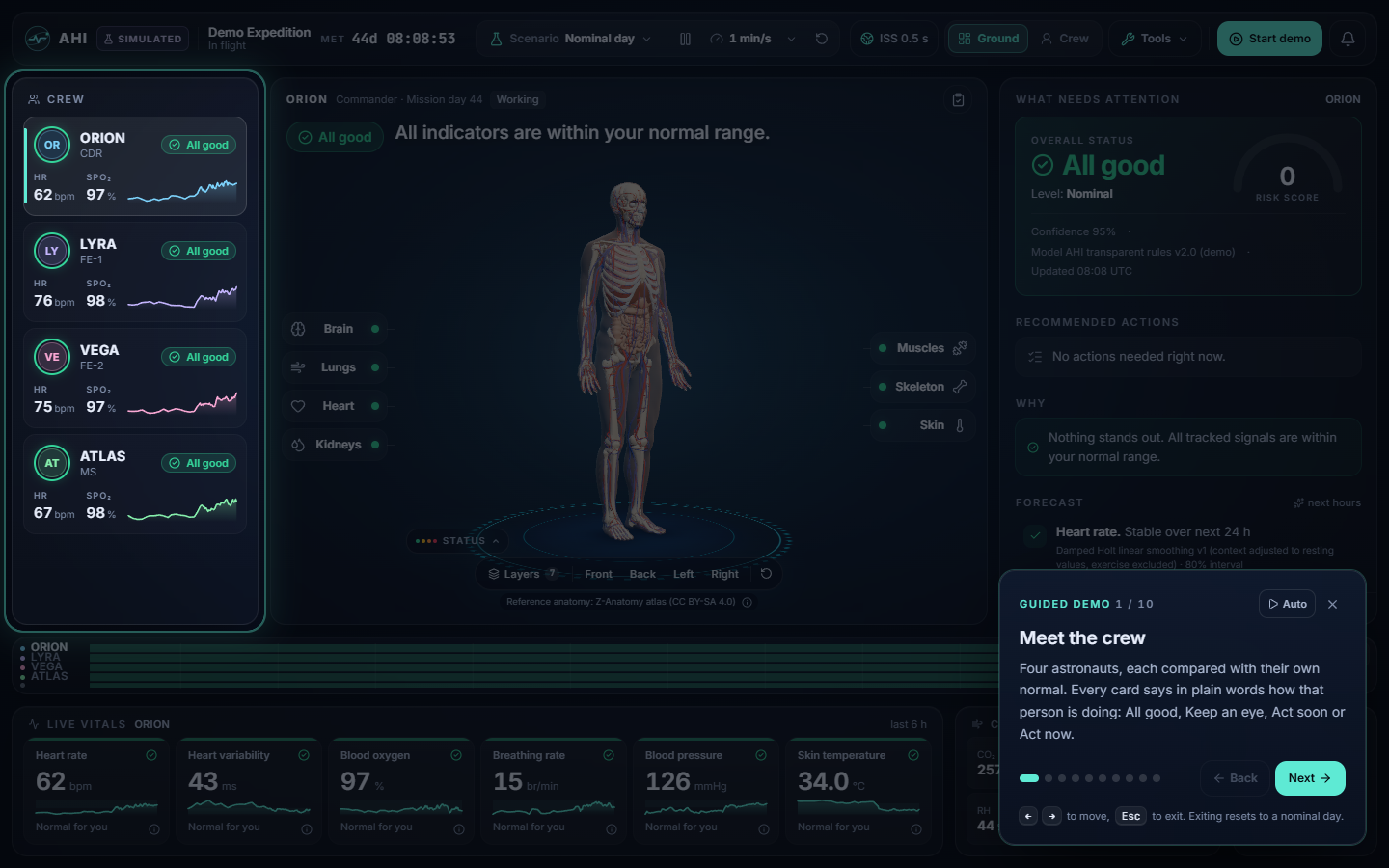
Click Start demo in the top bar. A 10 step tour spotlights each part of the screen and sets up the scenes by itself, so a presenter (or a judge) can follow the story without knowing the app.
| # | Step | What it sets up |
|---|---|---|
| 1 | Meet the crew | Nominal day, 1 min/s, ISS link, ORION selected |
| 2 | The body at a glance | Spotlight on the 3D body. Hint: click any structure (the panel shows its data, or says it is shown for reference only) |
| 3 | Acute cardio event | Acute cardio scenario on ORION; CRITICAL banner and escalation |
| 4 | What to do, and who can do it | Recommended actions with autonomy badges. Hint: Mark done on the rest protocol |
| 5 | Far from Earth | Switches the Earth link to Mars farthest (22 min each way) |
| 6 | Slow drift: progressive fatigue | Fatigue scenario on LYRA, jumps the simulation to about 48 sim hours, 1 h/s |
| 7 | Her normal, not an average | LYRA's heart, HRV chart with personal band, event markers and forecast |
| 8 | What if she follows the advice? | What-if comparison of the next hours with and without the action |
| 9 | Crew view: for the astronaut | Switches to the Crew view and the daily check-in |
| 10 | Mission tools | Tools menu: mission overview, handover report, data and model |
Controls: Next and Back (or → and ←), Auto to advance every few seconds (about 2 minutes for the whole tour), and Esc to exit. Exiting restores a calm state: nominal day, 1 min/s, ISS link, ORION selected, and your previous view.
Pitch script (about 4 to 5 minutes)
The full script is demo-script.md. All device data is simulated; say so once at the start. NASA DONKI space weather and the OSDR panels are real public data, shown as context only.
Setup. Run npm run dev in frontend/web, open http://localhost:5173 in full screen (1440x900 or larger), scenario Nominal day, speed 1 min/s, profile ISS. Optional: the backend with a key in backend/.env for live NASA data and Ask AHI. Click once in the page so the browser allows the alert sound.
| Time | Beat | What to do and say |
|---|---|---|
| 0:00 to 0:20 | Problem | Five hazards of long missions; many devices at different rates; medical support far away. |
| 0:20 to 0:50 | The screen in 10 seconds | Crew cards in plain words, the 3D body with its scan band, What needs attention, live vitals, the SIMULATED badge. |
| 0:50 to 1:10 | Monitor mode and zoom | Scroll over the heart (zoom to the pointer), click it: readings, personal band, Measured by. Monitor mode keeps the focus on what is measured. |
| 1:10 to 2:00 | Acute event, sound, fast decision | Acute cardio event on ORION: CRITICAL banner and alert sound. Mark done on the rest action, acknowledge (the sound stops). Press D for the spoken description. |
| 2:00 to 2:40 | Mission profiles and space weather | Switch to Mars transit, open the Mission and Earth link panel (the control in the top bar): cited dose rate, 4 to 24 min delay, mission dose vs the NASA 600 mSv career limit, DONKI space weather card (shelter advice if a recent X flare or SEP, otherwise calm; never "all clear" without data). |
| 2:40 to 3:20 | Slow drift | Progressive fatigue on LYRA at 1 h/s: HRV below her own band; pick the 7 day horizon and show the band widening. |
| 3:20 to 3:50 | Eyes | Eye changes (SANS like): the eyes read Watch from the flight day 30 exam; exam history against the pre-flight baseline. |
| 3:50 to 4:10 | Crew view | V: big status word, two actions, Your body systems cards, check-in. |
| 4:10 to 4:30 | Ask AHI (if a key is set) | "How is ORION doing?": streamed answer ending with "Based on:". Demo only; a mission needs an onboard model. |
| 4:30 to 4:45 | Impact | Close with the line below. |
We turn physiological and environmental signals into one integrated, explainable view of each astronaut's health, spotting trends before they become operational problems.
Backup beats if time allows
- Sensor failure (VEGA, 1 min/s): organs turn grey and the heart stops animating. Missing data is never shown as normal.
- Pause a device: Devices in the vitals strip, pause the shirt: "Paused by operator", no data, no sensor failure alarm.
- Cabin CO2 rise (10 min/s): the whole crew shifts slightly; the app shows co-occurrence and reminds that correlation is not causation.
Next steps to mention: the engine port to Python, a clinical review flow, authentication and role based access control and real ISS cabin data from NASA EDA. See the roadmap.
Next steps
- Product tour: every panel in detail.
- Device simulation and scenarios: how the scenarios are generated.
- Results and evidence: the full evaluation.